Why the Windows 11 Taskbar Remains Fixed: Microsoft’s Design Philosophy and the Debate Over User Control


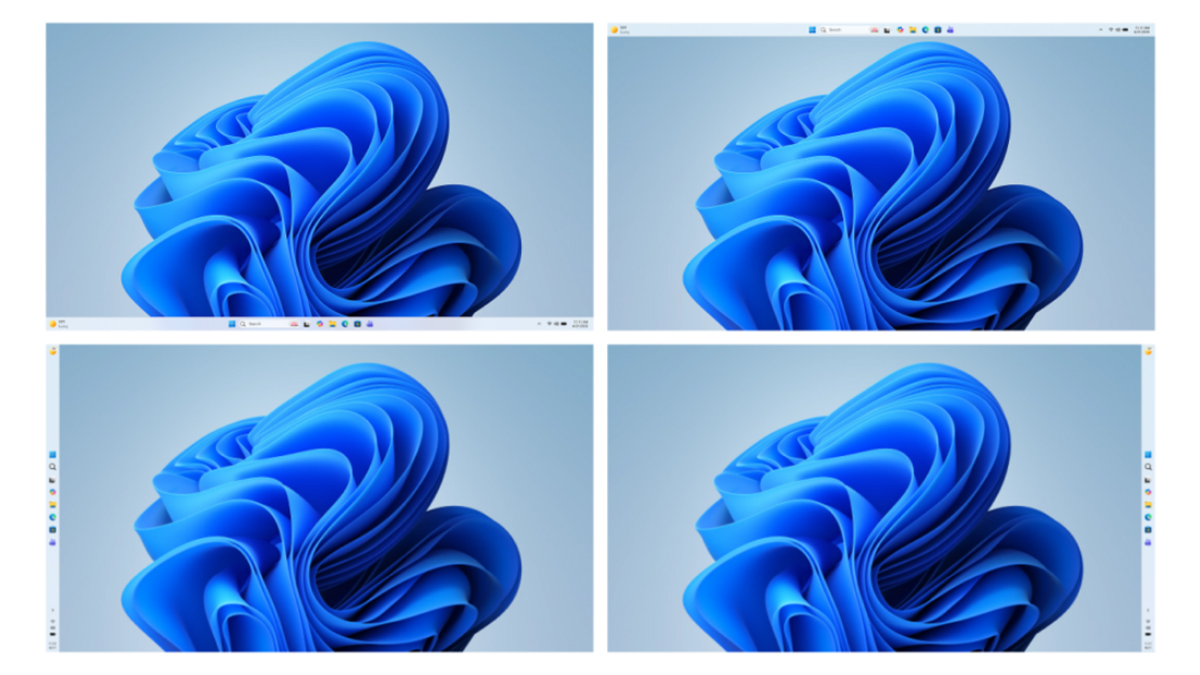
For years, the Windows taskbar was a flexible command center, allowing users to dock their applications to the left, right, top, or bottom of their primary displays. With the transition to Windows 11, this freedom was restricted, forcing the taskbar to remain permanently anchored to the bottom of the screen. While subsequent updates have restored the ability to change the taskbar’s alignment via the Settings menu, the long-standing request for a "drag-and-drop" repositioning feature remains unfulfilled. This design choice has sparked a persistent debate between power users who prioritize workflow customization and Microsoft’s design team, which emphasizes consistency and error prevention.
The Evolution of the Windows Interface
To understand the current friction, one must look at the evolution of the Windows desktop paradigm. Throughout the Windows 10 era and its predecessors, the taskbar was essentially a free-floating UI element. Users could "unlock" the taskbar, grab it with their cursor, and snap it to any edge of the monitor. This feature was a staple for enthusiasts who utilized ultrawide monitors or vertical display setups, where a side-mounted taskbar often offered a more efficient use of screen real estate.
When Windows 11 launched in late 2021, it introduced a complete overhaul of the taskbar’s underlying code. Built on the XAML-based platform rather than the older shell code of Windows 10, the new taskbar was designed for a centralized, modern aesthetic. However, this architectural shift meant that legacy features, including the ability to move the taskbar or display individual icon labels, were omitted at launch. The initial omission was met with significant backlash, leading Microsoft to reintroduce various functionalities through incremental feature updates.

The September 2026 Shift
The turning point for many users came with the September 2026 update. After years of telemetry and user feedback, Microsoft finally enabled support for moving the taskbar to the top or sides of the screen. While this addressed the primary demand for repositioning, it did not satisfy those who desired the fluid, "drag-and-drop" functionality of previous versions. Currently, users who wish to change their taskbar orientation must navigate to Settings > Personalization > Taskbar > Taskbar behaviors. This process, while functional, is seen as cumbersome by power users who frequently adjust their workspace based on the task at hand.
The Rationale Behind the Restriction: Accidental Interaction
The debate reached a fever pitch recently when Diego Baca, Vice President of Design for Windows at Microsoft, provided a rare, behind-the-scenes look at the reasoning behind this design decision. In a series of comments responding to public criticism, Baca clarified that the removal of drag-and-drop was not an oversight, but a calculated UX (User Experience) decision.
Microsoft’s internal data revealed that in previous versions of Windows, the ability to freely drag the taskbar resulted in a high volume of accidental movements. Many users—particularly those less familiar with complex UI settings—would unintentionally click and drag the taskbar while attempting to interact with application icons or the system tray. This resulted in the taskbar suddenly shifting to the side or top of the screen, creating confusion and requiring technical support or manual intervention to revert.
For the average consumer, a misplaced taskbar is not a feature; it is a point of frustration. By removing the drag-and-drop capability, Microsoft has effectively eliminated the possibility of "taskbar drift," ensuring that the interface remains predictable for the millions of users who rely on the OS for daily productivity.

The "Lock" Dilemma and UI Friction
Critics of Microsoft’s stance have frequently pointed to the "Lock the taskbar" feature found in Windows 10 as an ideal middle ground. This feature allowed users to toggle the ability to move the taskbar on or off, theoretically solving the accidental drag issue while maintaining power-user functionality.
However, Microsoft’s design team argues that this solution introduces "friction." According to Baca, adding an "unlock" toggle adds unnecessary complexity to the OS. If the system is locked by default, the power user must go through the extra step of unlocking it, moving the taskbar, and then locking it again to prevent future accidents. If the system is unlocked by default, the primary problem of accidental movement persists. From the perspective of the Windows design team, the goal is to create a frictionless experience where the most common user tasks are streamlined, even if it means deprioritizing less frequent, more "niche" customization workflows.
Broader Implications for Windows Customization
This conflict highlights a broader challenge for Microsoft: balancing the needs of a diverse user base that ranges from casual tablet users to enterprise system administrators and software developers. While the "mobile" taskbar is a point of contention for some, the company’s focus remains on stability and consistency across the Windows ecosystem.
Industry analysts observe that this approach mirrors the design language of mobile operating systems like iOS and Android, where interface elements are largely static to prevent user error. However, for a desktop operating system like Windows, which has historically been defined by its modularity, this "mobile-first" rigidity can be perceived as a step backward.
The current situation also suggests that Microsoft is increasingly reliant on telemetry to dictate UI development. If the number of users actively utilizing a feature is statistically low compared to the number of users experiencing negative side effects (like accidental clicks), the feature is often prioritized for removal or modification.
The Role of Third-Party Solutions
Given that Microsoft is unlikely to reverse its decision on drag-and-drop functionality in the near future, the task of satisfying power users has fallen to the developer community. A variety of third-party utilities have emerged to fill the gap, offering users the level of control they desire without compromising the stability of the core OS.
Tools like Taskbar Location Options and various Windhawk mods allow users to restore drag-and-drop functionality or force the taskbar into preferred positions. These tools act as "hooks" into the Windows shell, modifying how the taskbar reacts to user input. While effective, these solutions come with a caveat: they are susceptible to breakage. Whenever Microsoft pushes a significant cumulative update or a change to the shell architecture, third-party mods often fail until the developer releases a patch. This "cat-and-mouse" game between Microsoft’s updates and third-party developers is a recurring theme in the Windows customization landscape.
Is There Hope for Future Changes?
Despite the firm stance from Microsoft’s design leadership, the door is not necessarily closed. Diego Baca’s clarification that the current design is not a "never-again" declaration suggests that if there is sufficient, constructive feedback, the design team may explore alternative ways to satisfy power users without introducing the friction of a manual "lock" toggle.

Possible future solutions could include:
- Right-Click Menu Shortcuts: As previously tested in internal builds, providing a quick-access menu on the taskbar that allows users to select "Top," "Bottom," or "Side" would offer a faster, more controlled way to move the bar without the risks associated with free-form dragging.
- Advanced User Modes: A hidden setting within the registry or Group Policy that enables "Expert Customization," allowing users to opt into legacy behavior at their own risk.
- Dynamic UI Adjustments: Intelligent software that detects monitor configuration and suggests taskbar placement, automating the process for users with non-standard setups.
Conclusion: A Balancing Act
The ongoing debate over the Windows 11 taskbar is a microcosm of the evolution of modern computing. As operating systems strive for greater accessibility and mass-market appeal, the "open-ended" nature of desktop computing is gradually being refined into a more curated, error-resistant environment.
For the majority of users, the current implementation of the taskbar in Windows 11—where position is a deliberate setting rather than an accidental byproduct of a mouse gesture—represents a more stable and reliable experience. For the vocal minority of power users, however, it remains a reminder that the days of total desktop autonomy are slowly coming to a close. As Microsoft continues to refine the Windows 11 interface, the industry will be watching closely to see if they can find a path that honors the system’s heritage of flexibility while maintaining the high standard of usability expected in the modern era. For now, those requiring specific taskbar positioning will continue to rely on the vibrant, if sometimes precarious, ecosystem of third-party customization tools.
Related posts: