Bridging the Gap Between Video Intelligence and Creative Workflow: The Launch of the Mux Robots Adobe Premiere Pro Plugin

The landscape of professional video post-production has long been defined by a fundamental friction: the immense divide between automated machine learning outputs and the granular, human-driven demands of a standard editing timeline. While developers and digital platforms have increasingly leveraged artificial intelligence to parse, index, and translate video assets through JSON-based schemas, human video editors have remained tethered to manual workflows—manually scrubbing through hours of footage, dropping markers by hand, and painstakingly synchronizing translated audio tracks.
This operational bottleneck came to a head following the late-July Laracon conference, where event organizers sponsored a high-energy livestream of the annual Laravel community dodgeball tournament. Tasked with rapidly cutting a polished highlight reel from hours of raw event footage, the video production team turned to Mux Robots and its advanced "Find Key Moments" workflow. Although the underlying automated systems successfully identified critical plays, timestamps, and contextual data, the resulting JSON files offered little immediate utility inside Adobe Premiere Pro. Editors were still forced to manually translate machine-readable metadata into human-navigable timeline markers.
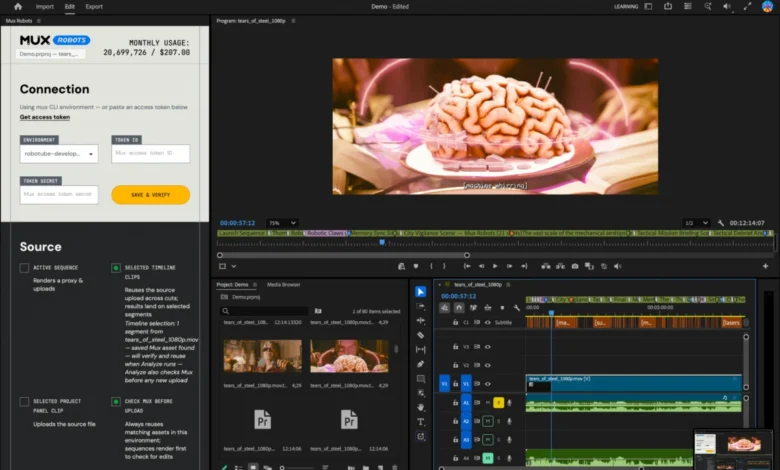
To permanently eliminate this disconnect between developer-facing APIs and creative editing suites, engineering teams developed the Mux Robots plugin for Adobe Premiere Pro. Released through the Adobe Creative Cloud Marketplace, the new integration directly ingests automated video intelligence workflows—ranging from chapter generation and key moment identification to localized captioning and audio dubbing—transforming raw API outputs into native, color-coded Premiere Pro timeline markers and project assets.
From Laracon Livestream to Post-Production Automation
The genesis of the Premiere Pro plugin traces back to practical necessity. When the team set out to distill the Laracon community dodgeball tournament into a cohesive, fast-paced highlight package, they utilized Mux Robots to process the expansive livestream recording. Mux Robots workflows are designed to analyze video content efficiently, extracting structural data that developers typically deploy to build interactive video players, search indexes, and automated content discovery applications.
However, the native output of these workflows—structured JSON data containing arrays, timestamps, and string variables—cannot be natively interpreted by non-linear editing software without custom intermediary tooling. For professional editor Tim, whose primary workspace centers around the Premiere Pro timeline, interacting with raw JSON data mid-session breaks the creative flow.
"Video editors spend much of their time trimming videos down to the moments that matter, editing captions, and localizing content with the right audio dubs and caption translations," engineering leads noted during the rollout. Recognizing that Adobe’s robust developer ecosystem for Creative Cloud applications provided the necessary hooks and APIs, the development team set out to construct a seamless bridge. By leveraging Adobe’s extensibility framework, they built a native panel that brings algorithmic video intelligence directly into the editor’s workspace, turning the timeline into an interactive map driven by machine learning.
Technical Mechanics: How the Plugin Operates on the Timeline
At its core, the Mux Robots plugin acts as a translator between cloud-based artificial intelligence services and desktop creative software. To understand its practical utility, one can examine how it handles structural metadata, such as the "Generate Chapters" workflow.
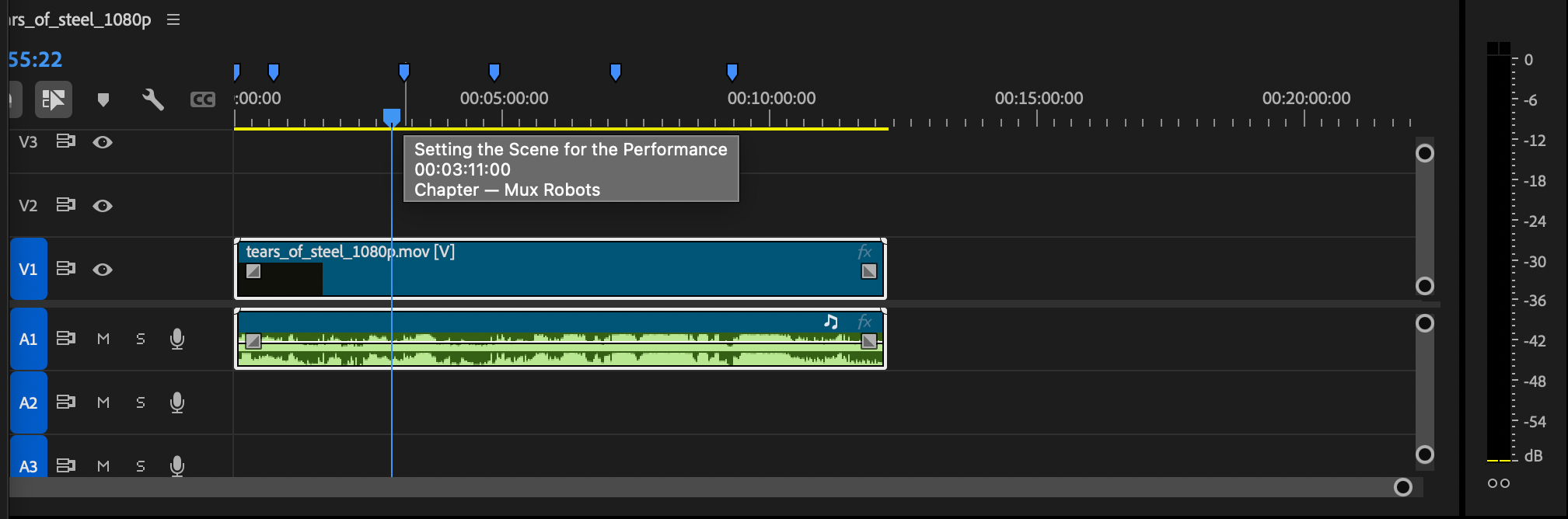
In a standard automated pipeline, a Generate Chapters API request returns a structured JSON payload containing sequential chapter titles paired with exact start times measured in seconds. For instance, a recording might output a schema structured as follows:
  "chapters": [

      "title": "Introduction to Mux Robots",
      "start_time": 0
    ,

      "title": "Introducing Find Scenes and Shots",
      "start_time": 61
    ,

      "title": "Detection Algorithms and Workflow Features",
      "start_time": 94
    ,

      "title": "User Feedback and Product Roadmap",
      "start_time": 155
    ,

      "title": "Customer Stories and Success Cases",
      "start_time": 189
    ,

      "title": "Conclusion and Best Practices",
      "start_time": 217

  ]
While valuable for web developers embedding a video player on a documentation site, this data requires manual entry to be useful to an editor. Once processed through the Mux Robots Premiere Pro plugin, however, this exact payload is translated instantaneously into visual markers along the timeline. Chapter breaks appear as distinct blue markers, allowing the editor to instantly jump between thematic sections without scrubbing through hours of raw footage.
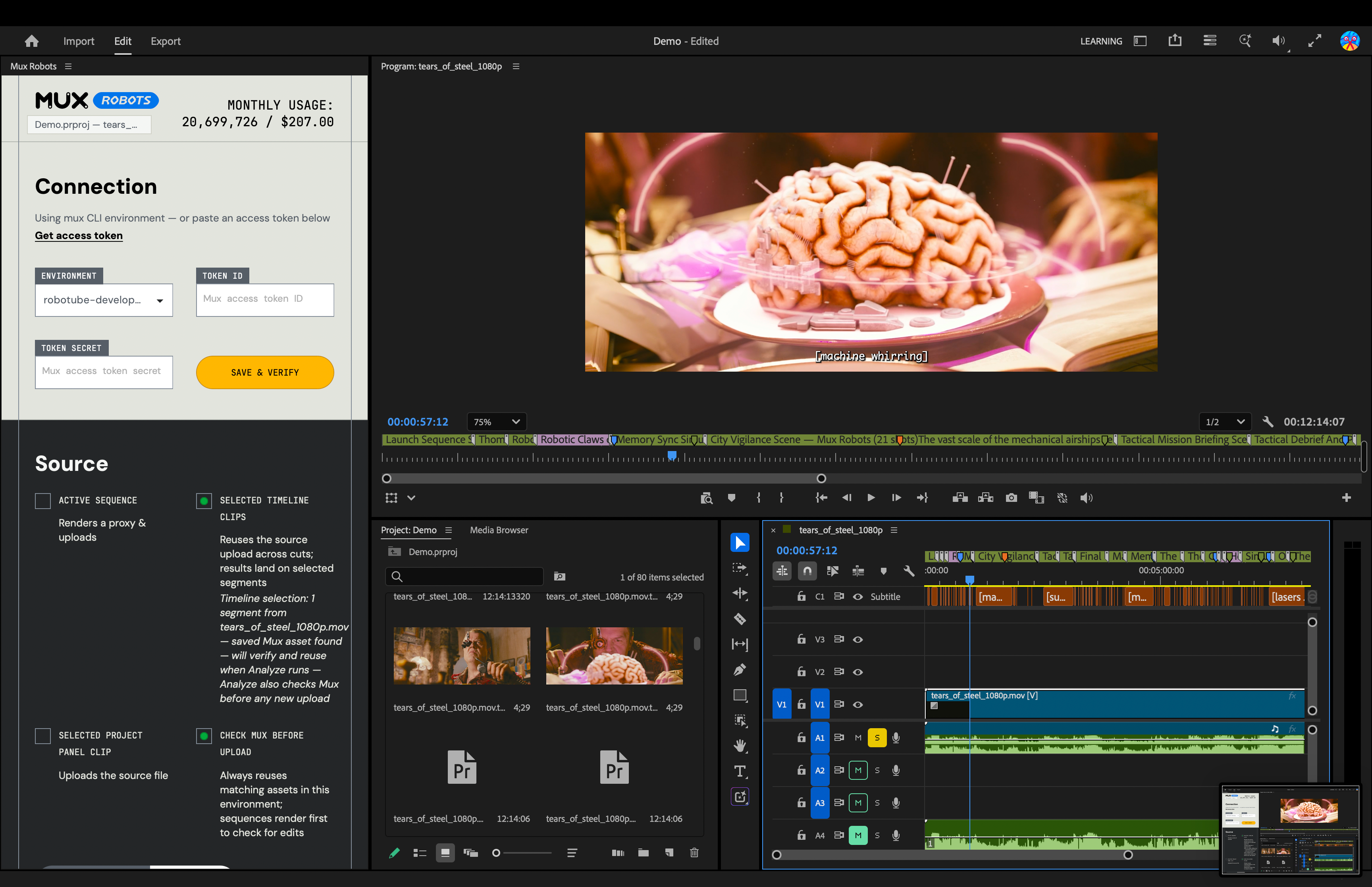
Beyond structural chapters, the plugin incorporates the "Find Key Moments" workflow, visually distinguishing high-impact highlights through custom-colored purple markers. When an editor hovers over a purple marker, detailed metadata extracted during the automated analysis job appears in context. This visual hierarchy ensures that editors can differentiate between structural markers (chapters) and content-specific highlights (key plays) at a glance.
Leveraging Directives for Sequenced Automation
One of the most powerful architectural components integrated into the plugin is the utilization of Mux Robots Directives. In advanced video processing pipelines, certain workflows possess strict dependency chains. For example, generating accurate chapters and identifying nuanced key moments often relies entirely upon the prior existence of a clean, verified transcript and caption track.
Rather than requiring editors to manually trigger separate, sequential API requests, the plugin introduces a unified command interface. By selecting a combination of workflows—such as "Generate Premium Captions," "Find Key Moments," and "Generate Chapters"—the plugin automatically bundles these requests into a single Directive.
When executed, the cloud backend processes the data sequentially: it generates the high-precision caption track first, and subsequently uses that textual data to inform and drive the chapter segmentation and key moment detection algorithms. The final output is then returned to the Premiere Pro timeline in the correct order, saving editors significant administrative overhead and reducing multi-step cloud rendering tasks to a single mouse click.
Global Localization and Multilingual Asset Management
In addition to structural organization and moment detection, the Mux Robots plugin addresses the increasingly urgent demand for cross-border content distribution and video localization. Modern media organizations rarely produce content exclusively for a single linguistic demographic; expanding reach requires immediate, scalable translation of audio and text assets.
The new plugin integrates audio dubbing and automated caption translation directly into the Creative Cloud environment. Editors can select their target languages directly within the plugin interface, prompting Mux Robots to generate translated audio tracks that can be placed straight onto the Premiere Pro timeline.
Translated caption tracks are similarly streamlined, routed directly into Premiere Pro’s native Media Browser where editors can drag and drop them into active projects as sidecar files or open captions. By streamlining localization, the tool enables lean production teams to prepare broadcast-ready assets for global audiences on the fly, transforming what was once a laborious post-production localization cycle into an automated background process.
Industry Implications and the Future of AI-Assisted Editing
The release of the Mux Robots plugin reflects a broader, industry-wide shift toward hybrid workflows that combine algorithmic efficiency with human creative oversight. For years, skepticism surrounding artificial intelligence in creative industries has centered on fears of displacement. However, tools that focus on automating administrative overhead—such as transcription, timeline marking, and asset sorting—demonstrate how machine learning can serve as an assistive co-pilot rather than a replacement for human editorial judgment.
By embedding backend developer tools directly into standard non-linear editing suites like Adobe Premiere Pro, technology providers are validating a new design philosophy: powerful infrastructure must meet creators where they already work. For small-to-midsize production houses, independent creators, and corporate media teams, the ability to bypass manual timeline markup translates directly into reduced turnaround times and lower operational costs.

Getting Started and Availability
The Mux Robots Adobe Premiere Pro plugin is available now and can be installed directly through the Adobe Creative Cloud Stock & Marketplace.
To begin utilizing the integration, users can search for "Mux Robots" within the Creative Cloud application ecosystem, install the extension, and launch it within Premiere Pro. Operational requirements are minimal: users must input a valid Mux Token ID and secret key to authenticate API requests and execute Mux Robots jobs from within the plugin interface. True to accessible development standards, Mux has made the plugin available without requiring an upfront credit card commitment to test basic workflows.