AWS CloudFormation Introduces Express Mode to Significantly Accelerate Infrastructure Deployments.

Amazon Web Services (AWS) has announced the launch of AWS CloudFormation Express mode, a pivotal enhancement designed to drastically accelerate infrastructure deployments. This new deployment mode is set to revolutionize how developers and AI tools iterate on infrastructure, promising up to a fourfold reduction in deployment times for critical workflows and production scenarios. By completing deployments once resource configuration is applied, rather than awaiting extensive stabilization checks, Express mode directly addresses a long-standing challenge in the realm of Infrastructure as Code (IaC): the often-protracted waiting periods that hinder rapid development and testing cycles.
Understanding CloudFormation’s Role in Modern Development
AWS CloudFormation stands as a cornerstone service for managing infrastructure on the AWS platform. As an Infrastructure as Code (IaC) tool, it allows users to define their AWS resources in declarative templates, automating the provisioning and updating of those resources. This approach ensures consistency, repeatability, and version control for cloud environments, which are crucial for large-scale deployments, regulatory compliance, and robust DevOps practices. Before IaC, managing cloud infrastructure often involved manual configurations through the AWS Management Console or imperative scripts, leading to inconsistencies, human error, and significant operational overhead. CloudFormation, by enabling the treatment of infrastructure as code, brought discipline and efficiency to cloud resource management.
However, even with the immense benefits of IaC, the deployment process itself could sometimes be time-consuming. A typical CloudFormation deployment involves several stages: template validation, change set creation, resource provisioning, and crucially, stabilization checks. These stabilization checks are designed to ensure that newly provisioned resources are not only created but also fully operational, capable of serving traffic, and integrated with other components before the stack operation is marked as complete. For instance, a database instance needs to be provisioned, configured, and then reach a "healthy" state where it can accept connections. Similarly, a Lambda function might require its associated network interfaces to fully establish and its execution role permissions to propagate. While essential for production-grade stability in many scenarios, these checks could add significant delays, particularly during development, testing, or rapid iteration cycles.
The Mechanics of Express Mode: A Paradigm Shift in Deployment Speed
Express mode fundamentally redefines the completion criteria for CloudFormation deployments. In the standard mode, a deployment is considered complete only after all resources have been provisioned and have passed their respective stabilization checks, ensuring they are fully operational. Express mode, conversely, declares a deployment complete as soon as CloudFormation confirms that the desired resource configuration has been applied. The critical difference lies in the timing of the deployment’s completion, not in how the resources are ultimately provisioned or their eventual operational state. Resources continue to become operational in the background, but the developer is freed to proceed with subsequent tasks or iterations much sooner.
This acceleration is particularly beneficial for workflows where immediate operational readiness is not a prerequisite for the next step. Consider a developer testing a minor configuration change to an SQS queue or an IAM policy. Waiting for full stabilization of these resources, which might involve network propagation delays or internal service readiness checks, can be an unnecessary bottleneck. Express mode bypasses these extended waits, providing a rapid feedback loop that is invaluable for continuous integration and continuous delivery (CI/CD) pipelines and, increasingly, for AI-assisted infrastructure development.
One of the key features of Express mode is its built-in resilience. CloudFormation automatically retries dependent resources that encounter transient failures during provisioning within the same stack. This intelligent retry mechanism helps mitigate timing issues that might arise as resources stabilize asynchronously, without requiring any manual intervention from the customer. This ensures that while the deployment completes faster, the underlying provisioning process remains robust and reliable, addressing potential race conditions that could otherwise occur when skipping full stabilization waits.
Quantifying the Impact: Real-World Performance Gains
The performance improvements offered by Express mode are substantial and immediately tangible. AWS provides compelling examples illustrating these gains. For instance, creating an Amazon Simple Queue Service (SQS) queue with a dead-letter queue (DLQ) in Standard mode might take approximately 64 seconds. With Express mode, this operation can complete in as little as 10 seconds. This represents a more than sixfold speed increase for a common messaging infrastructure component.
Even more dramatic are the gains for operations involving resources with complex dependencies or longer stabilization times. Deleting an AWS Lambda function that has a network interface attachment, a process notorious for its lengthy completion times in Standard mode (often 20 to 30 minutes due to the detachment and cleanup of elastic network interfaces), can now be accomplished in up to 10 seconds using Express mode. This specific example highlights the potential for massive productivity boosts, transforming a task that previously required significant waiting into a near-instantaneous operation.
These examples are not isolated cases. The "up to 4 times" speed improvement quoted by AWS suggests a broad applicability across various resource types and deployment scenarios. For a developer performing dozens of deployments daily during a feature development cycle, the cumulative time savings can be enormous, reducing frustration and allowing for more iterations in a given workday. In CI/CD environments, faster deployments translate directly into shorter pipeline execution times, enabling more frequent releases and quicker feedback on code changes. This efficiency gain can also lead to cost savings, as resources are tied up for shorter durations in non-production environments during testing and deployment phases.
Deployment and Integration: Getting Started with Express Mode
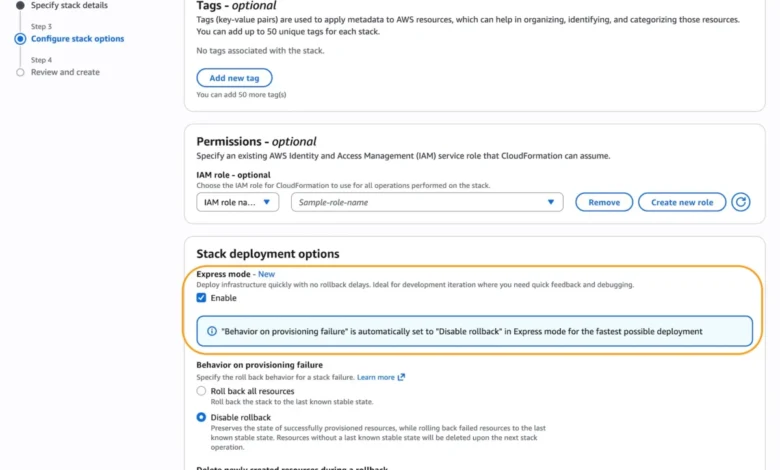
Activating CloudFormation Express mode is designed to be straightforward, integrating seamlessly with existing workflows and tools. Users can enable Express mode directly through the AWS Management Console. When creating a new CloudFormation stack, a simple toggle labeled "Enable" under the "Express mode" option within "Stack deployment options" activates the feature. This graphical interface ensures accessibility for users who prefer console-based operations.
For programmatic deployments and automation, Express mode is fully supported via the AWS Command Line Interface (AWS CLI), AWS SDKs, and popular Infrastructure as Code (IaC) tools such as AWS Cloud Development Kit (CDK). AI tools, including Kiro, are also highlighted as beneficiaries of this accelerated deployment capability.
When using the AWS CLI, developers can activate Express mode by setting the --deployment-config parameter to '"mode": "EXPRESS"' during stack creation, update, or deletion commands. No modifications to existing CloudFormation templates are required, ensuring backward compatibility and ease of adoption.
A key consideration for Express mode is its default behavior regarding rollbacks. To maximize iteration speed, Express mode disables rollbacks by default. This means that if a deployment fails, CloudFormation will not automatically revert the stack to its previous stable state. While ideal for rapid development and experimentation where minor failures are expected and easily remediated, this default should be carefully considered for production environments. For scenarios requiring rollback capabilities, users can explicitly set disableRollback to false within the deployment-config parameter. Alternatively, for development environments with disabled rollbacks, robust monitoring and cleanup mechanisms become crucial to manage failed deployments effectively.
The incremental deployment example provided by AWS showcases a common development pattern:
# Iteration 1: Deploy IAM role
aws cloudformation create-stack
--stack-name my-microservice
--template-body file://iteration1-iam.yaml
--deployment-config '"mode": "EXPRESS"'
--capabilities CAPABILITY_IAM
--role-arn arn:aws:iam::123456789012:role/CloudFormationDeployRole

# Iteration 2: Add Lambda function
aws cloudformation update-stack
--stack-name my-microservice
--template-body file://iteration2-lambda.yaml
--deployment-config '"mode": "EXPRESS"'
--capabilities CAPABILITY_IAM
--role-arn arn:aws:iam::123456789012:role/CloudFormationDeployRole

# Iteration 3: Add SQS queue and event source mapping
aws cloudformation update-stack
--stack-name my-microservice
--template-body file://iteration3-sqs.yaml
--deployment-config '"mode": "EXPRESS"'
--capabilities CAPABILITY_IAM
--role-arn arn:aws:iam::123456789012:role/CloudFormationDeployRole
This demonstrates how Express mode can be integrated into a phased deployment strategy, allowing developers to quickly build out complex microservices incrementally. For AWS CDK users, the integration is even simpler, with the cdk deploy --express command enabling the mode directly, abstracting the underlying CloudFormation CLI parameters.
Crucially, Express mode maintains full compatibility with all existing CloudFormation templates and features, including change sets and nested stacks. When Express mode is enabled on a parent stack, all its nested stacks automatically inherit this deployment behavior, simplifying management for complex, modular architectures. It is important to remember that for scenarios where resources must be fully operational before proceeding with traffic routing or critical testing, the default Standard mode, with its comprehensive stabilization checks, remains the recommended approach.
Broader Implications for the Cloud Ecosystem

The introduction of CloudFormation Express mode marks a significant evolution in cloud infrastructure management, with far-reaching implications across the developer ecosystem.
Enhanced Developer Productivity and Experience: The most direct impact will be on developer productivity. Reduced waiting times mean less context switching, enabling developers to stay focused on coding rather than monitoring deployment progress. This fosters a more fluid and enjoyable development experience, allowing for faster experimentation, prototyping, and debugging of infrastructure configurations. This aligns with the broader industry trend of "developer velocity" – equipping developers with tools that minimize friction and maximize output.
Accelerated CI/CD Pipelines: Modern software development relies heavily on automated CI/CD pipelines. Longer deployment times within these pipelines directly translate to slower feedback loops, delaying releases and increasing the time to market. Express mode will dramatically shorten the infrastructure provisioning stages of CI/CD, enabling more frequent builds, faster testing of infrastructure changes, and ultimately, quicker and more agile software delivery cycles. This could lead to a significant uplift in deployment frequency metrics for many organizations.
Catalyst for AI-Assisted Infrastructure Development: The rise of generative AI tools capable of creating or modifying infrastructure definitions is a burgeoning field. These AI models thrive on rapid feedback loops to learn and refine their outputs. Express mode’s sub-minute deployment times provide the necessary speed for AI tools to quickly provision, test, and validate generated infrastructure, accelerating the development and adoption of AI-driven DevOps practices. This could unlock new levels of automation and efficiency in cloud resource management.
Cost Efficiency: While CloudFormation itself is typically free beyond the cost of the resources it provisions, faster deployments can indirectly lead to cost savings. In development and testing environments, resources might be provisioned and de-provisioned multiple times a day. Reducing the time these resources are active, even by minutes, can accumulate into tangible cost savings over time, especially for large teams or complex testing matrixes.
Strategic Considerations and Best Practices: The choice between Express mode and Standard mode will become a strategic decision based on the specific workflow and environment. For production deployments where stability and guaranteed operational readiness are paramount before traffic shifts, Standard mode will likely remain the default. However, for development, staging, sandbox environments, and certain non-critical production updates where eventual consistency is acceptable, Express mode offers a compelling advantage. Organizations will need to develop internal guidelines and educate their teams on when and how to best utilize each mode, potentially integrating this choice into their CI/CD pipeline configurations. Implementing robust monitoring solutions will also be key to quickly identify and address any issues in Express mode deployments where rollbacks are disabled.
Availability and Future Outlook
AWS CloudFormation Express mode is available immediately in all AWS commercial Regions, incurring no additional cost beyond the standard charges for the resources provisioned. This broad availability and cost-free adoption make it accessible to a vast user base from day one. For detailed regional availability and future roadmap information, users are directed to the AWS Capabilities by Region portal. Comprehensive documentation for CloudFormation, including specific guidance on Express mode, is also readily available.
AWS encourages users to provide feedback on Express mode through AWS re:Post for AWS CloudFormation or via their usual AWS Support contacts. This commitment to user feedback underscores AWS’s continuous effort to refine and enhance its services to meet evolving customer needs. The introduction of Express mode is a testament to the ongoing innovation within AWS, focused on empowering developers with greater speed, flexibility, and control over their cloud infrastructure. It represents a significant step forward in optimizing the developer experience and accelerating the pace of innovation in the cloud.
Related posts: