Automating SCORM Package Creation for Learning Management Systems Using Agentic AI and Kiro

Publishing educational or corporate training materials to a Learning Management System (LMS) has long presented technical bottlenecks for instructional designers and content authors. Historically, transitioning raw text documents, slide decks, and training playbooks into a Shareable Content Object Reference Model (SCORM) format requires tedious, manual intervention. Authors must restructure standard presentations into discrete, trackable modules, manually code and edit XML-based SCORM manifests, and continuously troubleshoot packaging mechanics. These administrative and technical hurdles frequently pull subject matter experts and educators away from their primary responsibility: developing accurate, engaging course content.
To resolve these longstanding workflow friction points, recent advancements in agentic artificial intelligence (AI) and integrated development environments (IDEs) are introducing automated solutions. A prime example is Kiro, an agentic AI system equipped with both an IDE and a command-line interface (CLI). By leveraging Kiro, technical and non-technical authors alike can streamline the conversion of raw, unstructured training documents directly into fully compliant, upload-ready SCORM packages. Industry testing on standard sample courses indicates that this automated approach reduces packaging and compilation time from hours or days down to a matter of minutes.
Background and Context in Digital Learning Standards
The SCORM standard has served as the foundational interoperability specification for e-learning since the early 2000s. Developed by Advanced Distributed Learning (ADL)—an initiative of the United States Department of Defense—SCORM enables web-based learning content to communicate seamlessly with diverse LMS platforms. Whether an organization utilizes Moodle, Canvas, Blackboard, or proprietary corporate learning suites, a SCORM-compliant package ensures that user progress, completion status, and assessment scores are accurately tracked and reported.
Despite its ubiquity, SCORM compliance has notoriously strict packaging requirements. A standard SCORM 1.2 or SCORM 2004 package relies on a tightly defined directory structure, a precise manifest file named imsmanifest.xml, and specific JavaScript API calls to communicate runtime data back to the hosting LMS. Creating these structures manually demands specialized technical knowledge that falls well outside the traditional skillset of educators, technical writers, and human resources training personnel. Consequently, organizations have historically been forced to rely on expensive, monolithic authoring tools or dedicate valuable engineering hours to custom-build deployment pipelines.
The integration of agentic AI into this space represents a paradigm shift. Unlike traditional software utilities that simply convert file formats, agentic AI systems possess contextual awareness, iterative reasoning capabilities, and the ability to execute tasks within a controlled development workspace. This allows authors to interact with the build pipeline using natural language, transforming a rigid technical process into an intuitive, conversational workflow.
The Two-Layer Kiro Content Publishing Pipeline
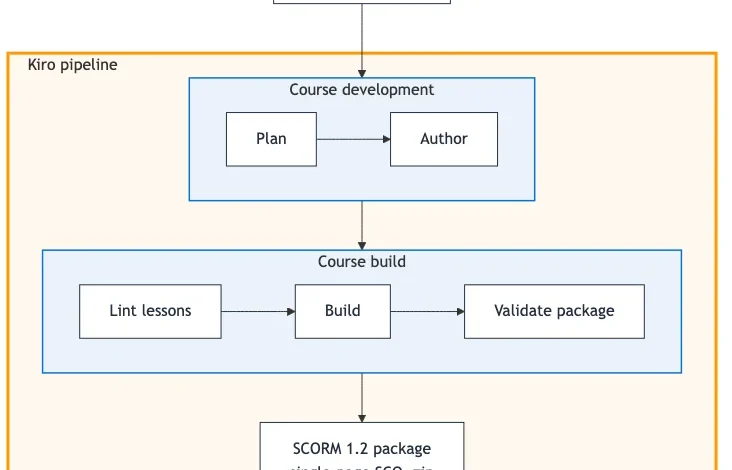
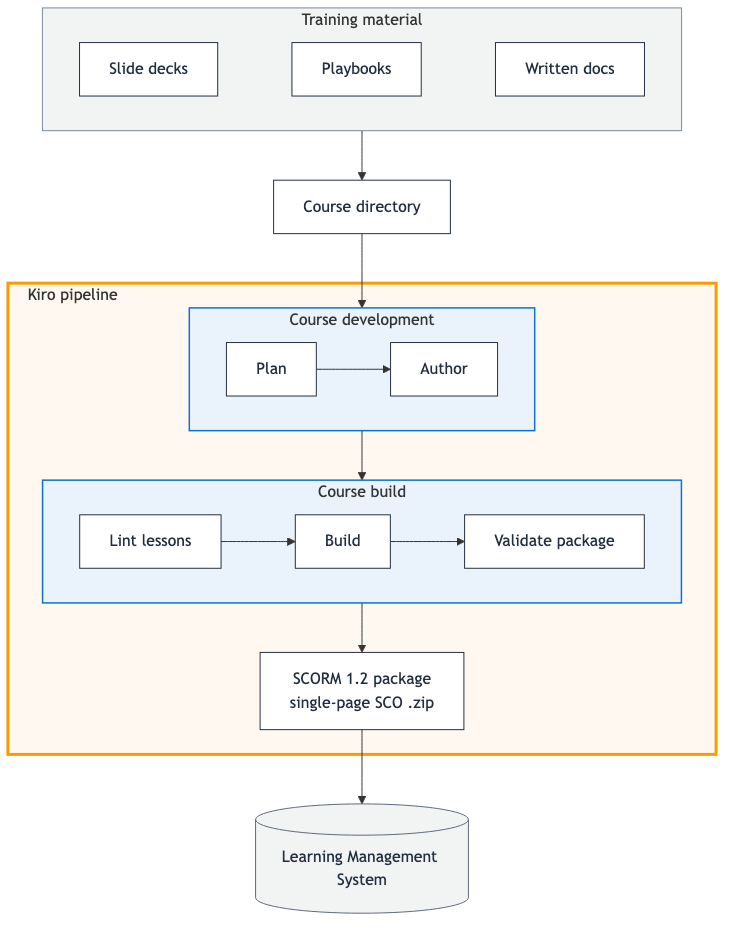
The operational architecture of the Kiro-driven SCORM pipeline is divided into two distinct phases: Course Development and Course Build. The pipeline is designed to operate locally within a standardized repository structure, eliminating the need for complex cloud infrastructure or external proprietary servers.
In the initial Course Development phase, the author deposits raw training assets—such as Markdown documents, PDF guides, or PowerPoint slide decks—into a dedicated course directory. Kiro assists the author in planning the curriculum layout, establishing module boundaries, and authoring individual lessons based on the source text.
Once the curriculum structure is established, the pipeline transitions to the Course Build phase. This stage encompasses three rigorous automated procedures:
- Linting: Validates the markdown syntax, structural integrity, and adherence to repository conventions across all newly authored lessons.
- Building: Generates the necessary HTML pages, asset directories, and the critical
imsmanifest.xmlfile required for SCORM compliance. - Validating: Executes automated test suites to ensure that tracking scripts, completion triggers, and scoring parameters meet the strict criteria mandated by the target LMS standard.
The final output of this pipeline is a compressed .zip archive containing a fully compliant SCORM 1.2 package, positioned locally and immediately ready for platform upload. Throughout this entire lifecycle, the human author drives the pipeline entirely through conversational prompts within the Kiro interface, entirely bypassing the need to hand-edit underlying XML or JavaScript configuration files.
Core Architectural Primitives and Repository Configuration
The efficiency of the Kiro pipeline relies on three foundational primitives native to the AI framework: Steering, Hooks, and Specs.
Steering Files and Knowledge Management
Steering functions as the operational memory of the pipeline, encapsulating the contextual rules and technical standards Kiro needs to execute tasks accurately. Steering documentation is divided into three activation modes:
- Always: Loaded into every active session to provide overarching guidance regarding product purpose, pipeline sequences, and technology toolchains.
- FileMatch: Automatically loaded only when specific file types or directories are actively being modified (such as enforcing SCORM packaging invariants).
- Manual: Deep-dive reference guides pulled into the context window strictly on an on-demand basis, covering advanced tasks like assessment authoring or complex course planning.
By modularizing this knowledge base within a .kiro/steering/ directory, the system ensures that the AI model remains precisely aligned with project constraints without overflowing its operational context window.
Automated Hooks
To minimize human error and eliminate repetitive administrative chores, the repository incorporates automated hooks. These scripts execute deterministically in the background as authors interact with the workspace, ensuring that linting checks, schema validations, and build-artifact updates occur automatically without requiring the author to manually remember and input terminal commands.
Spec-Driven Development
The architecture also embraces spec-driven development methodologies. For example, features such as page-dwell-gating—which enforces a mandatory minimum viewing time for learners before they can advance to subsequent pages—are maintained as formal specifications within the repository. This enables development teams to extend the pipeline’s capabilities systematically, ensuring that future instructional requirements can be integrated with the same rigor as the core build system.
Step-by-Step Implementation Walkthrough
Implementing the pipeline within an organization follows a straightforward, repeatable sequence:
- Prerequisites and Repository Initialization: The author clones the reference repository containing the Kiro pipeline configuration, ensuring that the local environment has access to the
kiro-clior the Kiro IDE extension. - Workspace Loading: Opening the repository within Kiro automatically ingests the workspace steering files located under
.kiro/steering/, immediately equipping the AI assistant with comprehensive knowledge of the course schema and SCORM invariants. - Content Ingestion and Prompting: The author places raw source documents into the designated
courses/<course-name>/directory. In the Kiro chat panel, the author issues a direct prompt, such as: "Plan and build a course from [course-name]." - Iterative Generation: Kiro formulates the primary
course.yamlmanifest, generates structured individual lesson files (lesson.md) for each module, and compiles the package assets. - Local Preview and Verification: Prior to LMS deployment, authors can perform a visual and functional verification by serving the unzipped build output locally using a standard lightweight HTTP server:
cd scorm/build
python3 -m http.server 8080
Navigating to
http://localhost:8080allows the author to interact with the course exactly as a learner would, verifying navigation links, multimedia rendering, and module summaries. - LMS Upload: Once verified locally, the generated
.ziparchive located incourses/<course-name>/scorm/dist/is uploaded directly to any SCORM 1.2-compliant LMS.
Broader Implications and Industry Analysis
The introduction of agentic AI frameworks to educational packaging addresses a persistent operational inefficiency in corporate training and academic institutions. Industry analysts note that instructional design teams frequently spend up to 40% of their project timelines grappling with technical deployment issues rather than focusing on pedagogical quality.
By abstracting away the complex packaging mechanics of SCORM, tools like Kiro democratize e-learning creation. Subject matter experts who possess deep domain knowledge—such as compliance officers, medical professionals, or software engineers—can author high-quality training materials using plain text and Markdown, leaving the intricacies of compliance, manifest generation, and metadata formatting to the automated agent.
Furthermore, because the entire build pipeline exists as version-controlled code within a local repository, organizations gain unprecedented auditability and consistency. Every curriculum change, structural update, and configuration modification is tracked through standard version control systems, ensuring long-term maintainability across enterprise training portfolios. As agentic AI continues to mature, pipelines of this nature are expected to set a new benchmark for software-assisted content authoring across digital education sectors.
Related posts: