Bridging the Gap Between AI Video Intelligence and Editing Suites: The Launch of the Mux Robots Adobe Premiere Pro Plugin

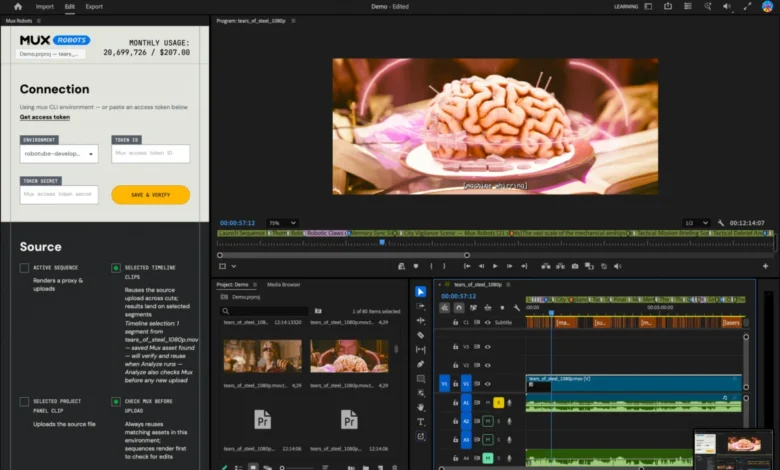
Video editing has long been characterized by meticulous, time-consuming manual labor. While artificial intelligence and automated video intelligence platforms have dramatically accelerated back-end processing, transcoding, and content analysis, a persistent friction has remained between raw data output and professional editing workflows. Developers receive structured JSON files filled with timestamps, transcripts, and metadata, but video editors rely on visual timelines within software like Adobe Premiere Pro. Recognizing this disconnect, video infrastructure platform Mux has introduced a native Adobe Premiere Pro plugin designed to seamlessly ingest Mux Robots workflows directly into the editor’s timeline, eliminating hours of manual marker placement and localization busywork.
The genesis of this development traces back to late July, when Mux sponsored the livestream of the annual Laravel community dodgeball tournament at Laracon. Following the event, the company tasked its in-house video editor, Tim, with cutting a comprehensive highlight reel from the raw footage. To expedite the process, Mux applied its automated Mux Robots "Find Key Moments" workflow to identify the most compelling plays across each game. Although the algorithm successfully pinpointed the high-intensity moments down to the exact second, the resulting JSON output required the editor to manually transcribe every single timestamp onto the Adobe Premiere Pro timeline. Determined to solve this workflow bottleneck, the engineering team leveraged Adobe’s Creative Cloud developer ecosystem to build a dedicated bridge between automated video intelligence and human creative control.
Understanding the Technical Integration and Timeline Mechanics
The core functionality of the Mux Robots Adobe Premiere Pro plugin centers on transforming raw algorithmic outputs into actionable visual elements on the editor’s timeline. In professional post-production, the timeline serves as the singular source of truth. By translating data into color-coded markers, the plugin allows editors to interact with AI-driven insights without ever leaving their primary workspace.
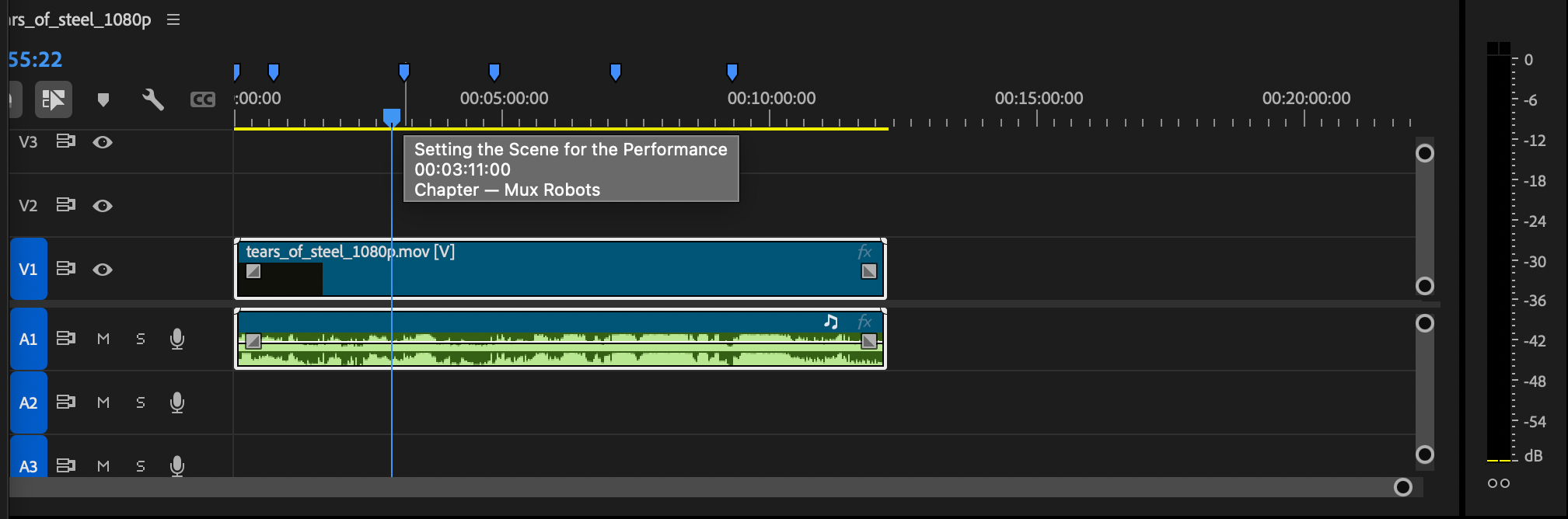
For instance, when utilizing the "Generate Chapters" workflow, the Mux API generates structured data containing chapter titles and start times. In a traditional workflow, an editor must copy these titles and manually drop markers at each designated timestamp. With the Mux Robots plugin, this process is entirely automated. Upon running the workflow, blue markers instantly populate the timeline, perfectly aligned with the start time of each chapter.
Similarly, running the "Find Key Moments" workflow populates purple markers along the timeline. These markers are distinct in color and dynamically display detailed output data when hovered over by the cursor. Furthermore, editors can implement specific parameters prior to running the job, allowing them to steer the AI’s focus and ensure that the highlights align with the creative vision of the project.
Workflow Sequencing via Directives
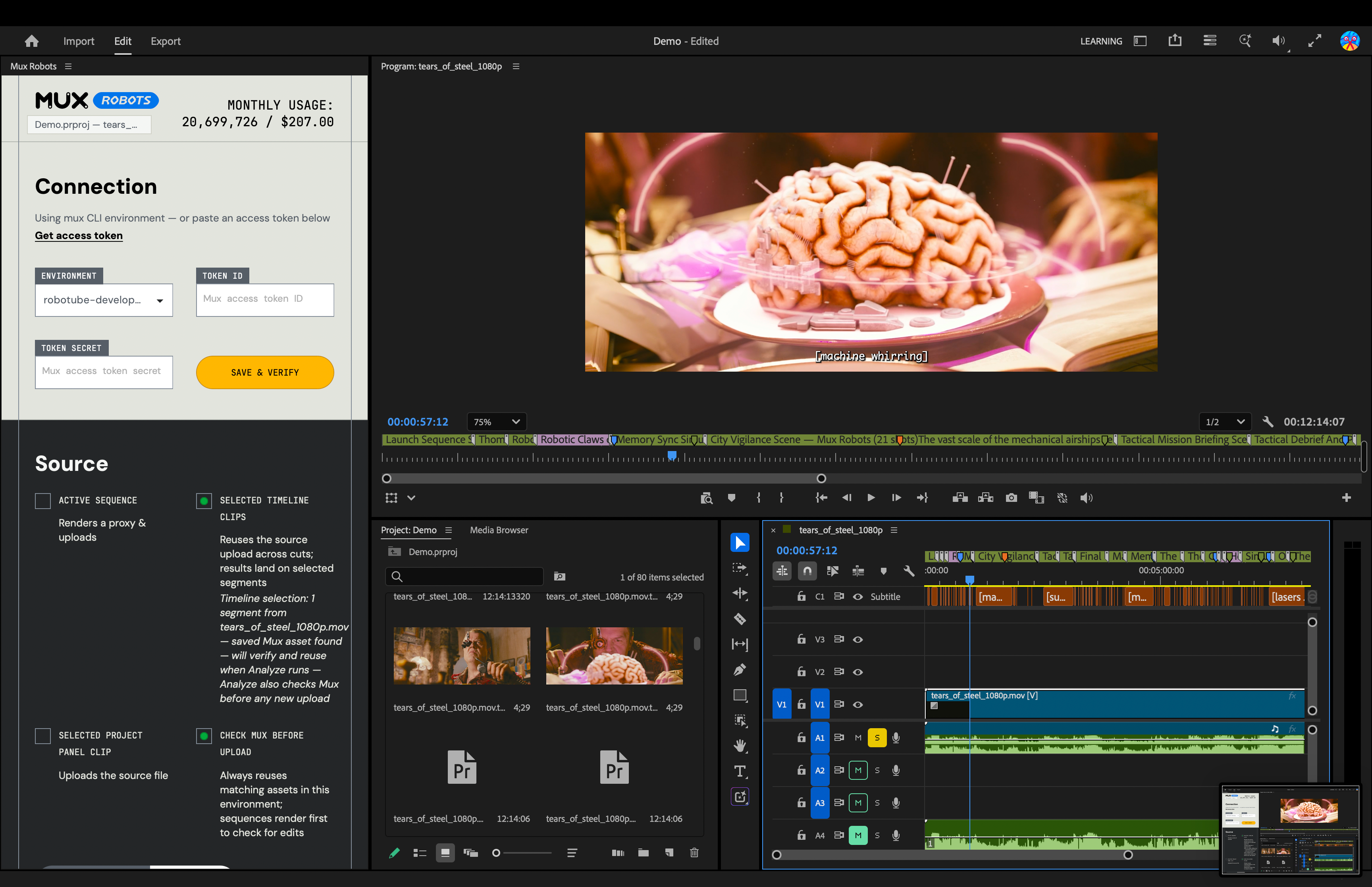
One of the most powerful architectural components integrated into the plugin is the utilization of Mux Robots Directives. In advanced video engineering, certain AI processes are dependent on others. For example, generating accurate chapter markers and identifying key moments frequently relies on a pristine, verified transcription of the source audio.
Rather than requiring users to manually execute sequential API calls, the Mux Robots plugin allows editors to bundle multiple workflows into a single action. By selecting "Generate Premium Captions," "Find Key Moments," and "Generate Chapters" simultaneously within the plugin interface, the system constructs a Directive. This tells the backend infrastructure to execute the captioning process first, followed sequentially by the chapter and key-moment detection jobs which utilize the newly created caption track. This one-click orchestration significantly reduces friction in complex, multi-layered post-production environments.
Global Localization and Multilingual Accessibility
Beyond structural organization and highlight detection, modern video production increasingly demands rapid localization to serve global audiences. Historically, localizing a video meant exporting audio stems, sending them to translation services, waiting for voice actors or synthetic dubbing engines to generate new audio tracks, and manually aligning them in the editing suite.
The Mux Robots plugin brings sophisticated audio dubbing and translation capabilities directly into Adobe Premiere Pro. Editors can select their desired target languages directly from the plugin panel. Mux Robots then processes the translations and places the resulting audio assets directly onto the Premiere Pro timeline. Caption tracks are handled with equal efficiency, automatically populating within Premiere Pro’s Media Browser where they can be dragged and dropped into the active project as needed. This capability transforms localization from a post-production hurdle into an instantaneous, on-the-fly asset generation tool.
Industry Implications and the Future of AI-Assisted Editing
The release of the Mux Robots plugin reflects a broader, industry-wide shift toward integrating artificial intelligence into established creative workflows rather than attempting to replace human editors entirely. While fully automated video generators have captured public fascination, professional production pipelines require granular control, precision, and adherence to established industry standards.
By focusing on interoperability—specifically targeting Adobe Premiere Pro, which commands a massive market share among professional video editors—Mux has positioned its video intelligence tools as collaborative assistants rather than isolated black boxes. Industry analysts note that tools reducing administrative friction in post-production can yield substantial efficiency gains, potentially cutting initial assembly and rough-cut phases down by significant margins. For lean creative teams, agency environments, and live-event producers dealing with massive volumes of raw footage, the ability to automate metadata placement and localization without leaving the timeline represents a substantial operational advantage.

Availability and Getting Started
The Mux Robots plugin for Adobe Premiere Pro is currently available to the public through the Adobe Creative Cloud Stock and Marketplace. Creators and developers interested in testing the integration can install the application directly through Creative Cloud or via the Adobe Exchange portal. To execute Mux Robots jobs from within the interface, users simply require an active Mux account paired with a valid Token ID and secret. In alignment with Mux’s developer-first onboarding philosophy, getting started requires no upfront financial commitment or credit card, allowing engineering and editorial teams to evaluate the plugin’s impact on their existing pipelines risk-free.
Related posts: