How a Traditional Graphic Designer Used AI to Build a Custom Video.js v10 Skin from Scratch


The intersection of artificial intelligence and creative disciplines has reached a significant milestone as non-technical professionals successfully bridge the gap between design and production code. In a recent development highlighting the evolution of modern workflows, a traditional brand and graphic designer with no formal software development background has independently designed, coded, and deployed a custom skin for the Video.js v10 media player. The project, which is currently live on Vercel and slated for official deployment on the video infrastructure platform Mux, illustrates a broader paradigm shift in how digital products are conceptualized, built, and shipped across the tech and design industries.
This achievement underscores a rapidly changing landscape where generative AI tools are no longer confined to the engineering department. Instead, they are integrating seamlessly into the toolkits of creative professionals, allowing them to bypass traditional handoff bottlenecks and execute complex technical implementations independently.
From Print Catalogues to Digital Brands: A Traditional Design Background
The creator of the Video.js skin began their career rooted firmly in traditional print media, starting out by manually laying out extensive museum catalogs and books exceeding 400 pages using Adobe InDesign. Over time, this foundational expertise in typography, grid systems, and visual hierarchy expanded into web design and broader brand identity development.
Despite transitioning into digital mediums, the designer’s methodology remained staunchly analog at its core. Every project traditionally began with a blank digital canvas, relying on manual exploration, methodical placement of shapes and colors, and iterative fine-tuning. While this deliberate process produces high-quality aesthetic results, it is inherently time-consuming and has historically required close collaboration with software engineers to translate static mockups into functional web interfaces.
The Initial Skepticism and Industry Shifts
As generative AI capabilities matured rapidly heading into 2026, the technology permeated engineering workflows, quickly followed by integration into mainstream creative software suites. However, widespread adoption among non-technical creatives was initially met with hesitation. Early public perceptions of generative AI—often characterized by surreal, flawed outputs such as viral imagery of AI generating malformed hands or eccentric scenes—left many traditional artists questioning the practical utility of these tools for professional design.

While software developers quickly embraced AI for tasks like debugging, writing boilerplate code, and testing—operations with binary correct or incorrect answers—designers struggled to see how a text- or prompt-based model could comprehend the nuanced context of visual aesthetics, brand voice, and user experience. Consequently, many creative professionals initially chose to keep AI tools at arm’s length, fearing the technology either lacked true utility or would require a technical literacy they did not possess.
The Catalyst: Breaking Through the Design-to-Development Gap
The turning point for many designers often arrives through casual exposure within multidisciplinary teams. In this instance, the barrier was broken when a developer coworker suggested utilizing Claude, an advanced AI assistant, to address a list of web page design tweaks rather than going through traditional, granular engineering handoffs.
By feeding the design feedback directly into the AI interface, the designer was able to instantly generate and test multiple iterations in real time within the browser. This eliminated the friction of waiting for developer bandwidth and removed the psychological barrier of feeling like a burden during routine update requests. Over the subsequent months, this informal experiment evolved into a structured habit. The workflow expanded to include designing layouts in Figma, uploading assets to the AI assistant, and rapidly reviewing staging environments—fundamentally altering how creative visions were brought to life.
The Assignment: Deploying Video.js v10 for Mux
The ultimate proving ground for this newly adopted workflow arrived with the General Availability (GA) release of Video.js v10. As part of a larger technical migration, video infrastructure platform Mux initiated plans to transition its marketing and documentation websites from legacy players to the updated Video.js framework.
While the standard out-of-the-box skin provided a functional foundation, the design team required a custom skin that reflected Mux’s distinct brand identity—characterized by sharp angles, a brutalist aesthetic, deceptively simple layouts, and subtle playful touches. Traditionally, realizing this vision would have necessitated extensive frontend engineering resources to override default player styles, write custom CSS, and handle deployment pipelines. Instead, the designer undertook the challenge independently.
Leveraging official documentation, the Node.js runtime environment, and specialized AI frameworks such as the Build with AI tutorial resources, the entire initial setup was completed in minimal time. By issuing a prompt to Claude Code—specifying parameters modeled after the core visual identity of the Mux website—a fully functional, customized video player was compiled, hosted on Vercel, and rendered in a browser within thirty minutes.
An Integrated Workflow: Figma, AI, and the Browser
The resulting workflow demonstrates a harmonious synthesis of human creative judgment and machine execution. Rather than replacing traditional design applications, the AI tool acts as an intelligent bridge between conceptualization and realization.
- Ideation and Exploration: Figma remains the primary workspace for high-level creative thinking, visual experimentation, and asset creation.
- Translation and Execution: AI-driven coding environments interpret design intent, converting visual specifications and icon files into functional HTML, CSS, and JavaScript components.
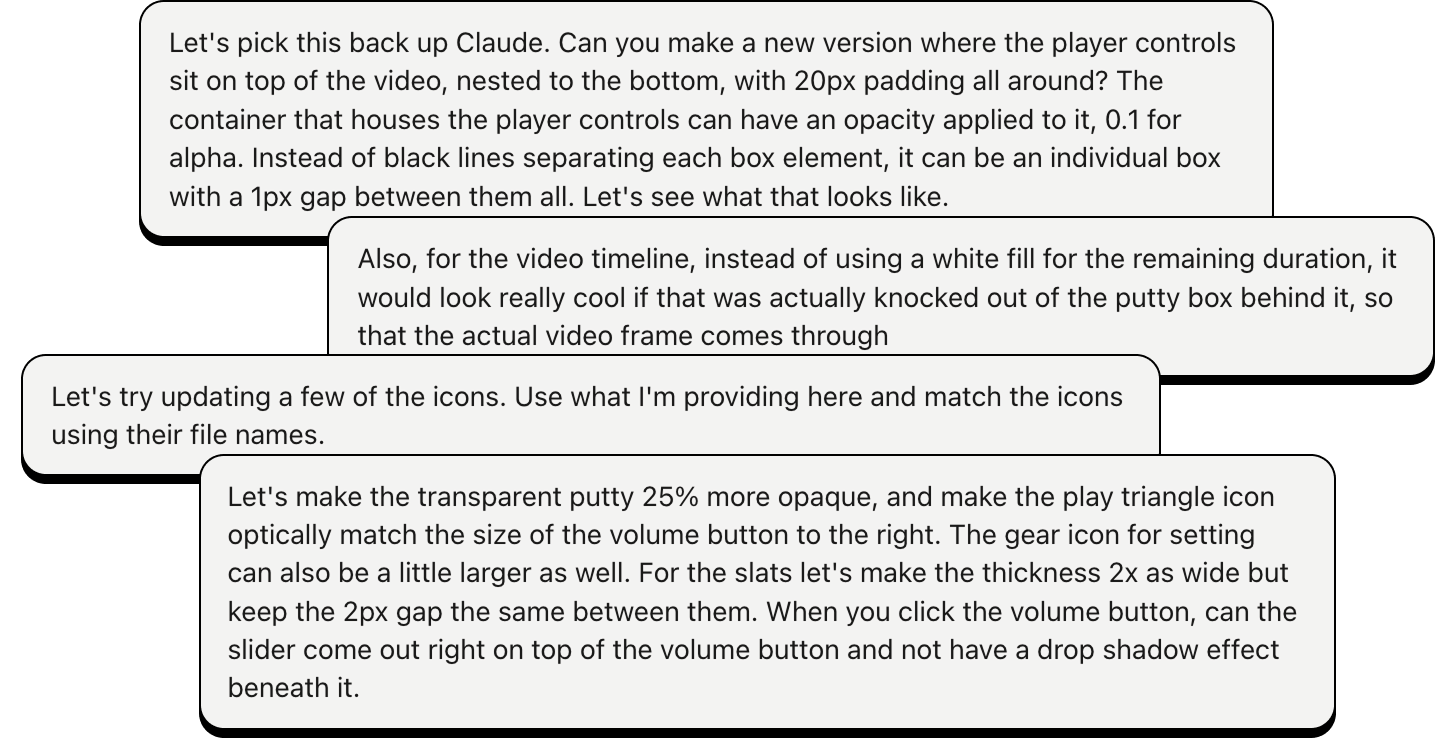
- Evaluation and Refinement: The web browser serves as the ultimate testing ground, where the designer evaluates the live output, adjusts parameters, and fine-tunes details like padding, opacity, icon dimensions, and control bar positioning through iterative prompting.
This triad allows creators to move fluidly between design and code, closing the traditional communication gap that has historically slowed down product development cycles.
Industry Implications: Empowering the Creative Class
The successful deployment of a custom video player skin by a non-developer highlights a broader trend transforming the technology and media sectors. As AI tooling becomes more intuitive, the traditional boundaries separating visual designers from technical implementers are beginning to dissolve.
Industry analysts note several key implications of this shift:
- Accelerated Time-to-Market: Teams can iterate on user interfaces and digital products at the speed of thought, reducing the time required from initial wireframe to live deployment.
- Enhanced Designer Autonomy: Creative professionals are no longer strictly reliant on engineering availability to test their concepts in live production environments, leading to more faithful execution of original design intents.
- Evolution of Skill Sets: While foundational skills—such as visual taste, typographic hierarchy, and critical judgment—remain entirely human-driven, basic technical literacy and prompt engineering are rapidly becoming valuable complementary competencies for modern designers.
Looking forward, as platforms continue to lower the barriers to entry for software creation, the role of the designer is expanding. No longer restricted to static mockups and handoff documents, creative professionals are increasingly equipped to take their visions all the way to the finish line—ensuring that the final digital product retains every ounce of the original design’s nuance and intent.