Microsoft Issues Emergency Windows 11 Fixes for Dell Systems Facing Performance Degradation and Unexpected Shutdowns

Microsoft has officially deployed a series of emergency, out-of-band (OOB) updates to rectify a critical compatibility flaw that has plagued a specific segment of Dell personal computers following the release of the July 2026 security updates. The software giant’s intervention comes after reports of widespread performance degradation, excessive heat generation, and frequent unexpected system shutdowns on Dell hardware running the latest versions of Windows 11. The conflict, which primarily stems from a driver incompatibility, had initially led Microsoft to halt the distribution of regular updates to affected machines to prevent further stability issues.
The emergency patches, identified as KB5121767 and KB5121768, are specifically designed to address a breakdown in communication between the Windows operating system and core Intel hardware management drivers. While Microsoft typically adheres to a strict "Patch Tuesday" monthly release cycle, the severity of the symptoms—ranging from rapid battery drain to hardware-threatening thermal levels—necessitated an immediate response outside the standard schedule.
The Technical Root Cause: A Conflict of Frameworks
The genesis of this technical failure can be traced back to the June 2026 "preview" cumulative update (KB5095093). In this update, Microsoft introduced a refined version of the Windows USB-C Connection Manager interface. While the interface was intended to improve the handling of modern peripheral connectivity and power delivery over USB-C, it inadvertently created a logic conflict with the Intel Innovation Platform Framework (IPF) Processor Participant driver.
The Intel IPF is a sophisticated system-level hardware driver responsible for managing a laptop’s or desktop’s power profiles, thermal thresholds, and overall processor behavior. In modern Dell systems, this driver acts as the intermediary between the hardware sensors and the Windows power management subsystem. When the new Windows USB-C Connection Manager was introduced, it interfered with the IPF’s ability to correctly report or receive thermal and power data.
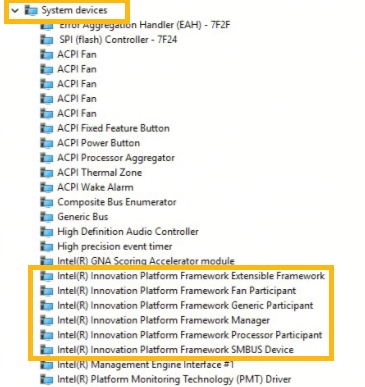
As a result, the operating system would lose the ability to regulate the processor’s clock speed or cooling fans effectively. This breakdown manifested visibly in the Windows Device Manager, where the "Intel Innovation Platform Framework Processor Participant" entry would be flagged with a yellow exclamation mark, signifying a driver error or "Code 10" failure.
Documented Symptoms and User Impact
The impact on Dell users was immediate and varied, depending on the specific hardware configuration and the workload being performed. According to technical documentation released by Microsoft and verified by Dell’s engineering teams, the primary symptoms included:
- Unexpected Shutdowns: Systems would abruptly power off without a standard "Windows is shutting down" sequence. This was likely triggered by internal hardware failsafes when the CPU reached critical temperatures that the driver failed to mitigate.
- Thermal Throttling and Heat: Because the IPF driver could not communicate thermal limits to the OS, some systems ran significantly hotter than usual, even under light loads.
- Performance Degradation: Conversely, some systems entered a "safe mode" performance state, locking the CPU at its lowest possible frequency to prevent overheating, resulting in a sluggish user experience.
- Battery Depletion: The lack of efficient power management meant that mobile devices, such as the Dell XPS and Latitude series, experienced a drastic reduction in battery life, as power-saving states were no longer being correctly entered.
Chronology of the Crisis
The timeline of the issue highlights the complexities of modern software-hardware ecosystems where a single driver conflict can disrupt global operations for a major manufacturer.
- June 23, 2026: Microsoft releases the optional preview update KB5095093. This update includes the new USB-C Connection Manager. Dell’s internal testing begins to flag anomalies on certain hardware revisions.
- July 14, 2026: The July Security Update (KB5101650) is released. This "Patch Tuesday" update incorporates the changes from the June preview. As it is a mandatory security update for many organizations, adoption is rapid.
- July 21, 2026: Microsoft officially acknowledges the issue after a surge in support tickets. The company places a "compatibility hold" on affected Dell devices, preventing them from downloading the July security update until a solution is found.
- July 24, 2026: Microsoft and Dell engineers identify the specific interaction between the Intel IPF driver and the USB-C manager.
- July 25, 2026 (Saturday): In a rare weekend release, Microsoft issues the emergency OOB updates KB5121767 and KB5121768 to resolve the conflict and lift the compatibility hold.
Scope of Affected Systems
The issue was not universal across all Windows devices but was highly concentrated within the Dell ecosystem due to their specific implementation of the Intel Innovation Platform Framework. The affected versions of the operating system included:
- Windows 11, version 25H2: The latest feature update for mainstream users.
- Windows 11, version 24H2: The previous year’s major release, still widely used in corporate environments.
- Windows 11 Enterprise LTSC 2024: The Long-Term Servicing Channel version, which is critical for industrial, medical, and high-stability environments.
For users on the Enterprise LTSC 2024 version, the specific fix is designated as KB5121768, while all other mainstream versions of Windows 11 24H2/25H2 are covered by KB5121767. Microsoft emphasized that these updates are "targeted fixes" and are only recommended for those experiencing the aforementioned issues or those who have been blocked from receiving security updates.
Official Responses and Industry Reaction
Microsoft’s support documentation was unusually candid regarding the source of the report, stating, "This issue was reported by Dell during testing and identified as an incompatibility between the Intel driver and the new Windows USB-C Connection Manager interface." This transparency suggests a high level of collaboration between the two companies to prevent a larger-scale PR crisis.
Dell has advised its customers to ensure their BIOS and chipset drivers are up to date through the Dell SupportAssist application in conjunction with the Windows emergency patch. While Dell has not issued a formal press release, their support forums have been active with moderators guiding users through the manual installation of the OOB updates.

Industry analysts suggest that this incident highlights a growing challenge in the Windows ecosystem. As Windows 11 moves toward more modular driver frameworks and advanced power management interfaces, the margin for error in driver-OS synergy is narrowing. "We are seeing a trend where ‘standard’ updates are increasingly touching low-level hardware abstractions," said one analyst. "When you change how a PC manages its USB-C ports—which are now tied into the entire power delivery system—you risk cascading failures in thermal management."
Deployment and Mitigation Strategies for IT Administrators
For individual home users, the fix will likely arrive via Windows Update automatically, provided their device was not completely disabled by the bug. However, for enterprise environments, the deployment requires more deliberate action.
Microsoft has outlined three primary paths for deployment:
- Windows Autopatch: Devices enrolled in Windows Autopatch with "hotpatching" enabled will receive the update automatically without requiring a full system overhaul, though a restart is still mandatory to re-initialize the Intel driver.
- Microsoft Intune: IT administrators can use the "Expedite Windows Quality Updates" feature in Intune to push KB5121767 or KB5121768 to affected groups of Dell machines immediately.
- Microsoft Update Catalog: For air-gapped systems or those managed via older WSUS (Windows Server Update Services) configurations, the updates are available for manual download from the Microsoft Update Catalog.
Microsoft has clarified that if a device does not show the "yellow exclamation mark" in Device Manager and is not experiencing performance drops, the update is not strictly necessary, though it will eventually be rolled into the August 2026 cumulative update.
Broader Implications for the Windows 11 Lifecycle
This emergency patch serves as a reminder of the risks associated with "Preview" updates. KB5095093, which introduced the flaw, was an optional preview update. Many organizations and power users install these to get early access to features, but this incident underscores why many enterprise IT policies strictly forbid the installation of non-security preview patches.
Furthermore, the focus on Windows 11 24H2 and 25H2 indicates that Microsoft is aggressively updating the core architecture of these versions. As the company prepares for the next generation of "AI PCs" and advanced hardware configurations, these types of low-level driver conflicts may become more frequent if testing protocols do not account for the vast diversity of OEM (Original Equipment Manufacturer) hardware implementations.
For Dell, the incident is a minor setback in what has otherwise been a strong year for their hardware reliability ratings. The rapid identification of the bug by Dell’s testing team prevented the issue from becoming a "bricking" event, where devices would be rendered totally unbootable.
Conclusion and Future Outlook
As of late Saturday, Microsoft confirmed that the compatibility hold on Dell devices is being progressively lifted. Users who were previously told their "device is not quite ready for the latest update" should now see the July security update appearing alongside the emergency fix in their Windows Update settings.
The tech community remains watchful of the August 2026 update cycle to see if these fixes are successfully integrated without introducing secondary regressions. For now, Dell users are urged to check their Device Manager for any warnings under "System Devices" and to apply the OOB patches to ensure their hardware operates within safe thermal and power parameters. This event stands as a testament to the critical nature of driver-OS harmony in an era where hardware is increasingly reliant on complex software frameworks to function efficiently.
Related posts: